DailyDispatch is a single HTML file that becomes your daily feed, markdown notebook, task board, meeting companion, and backup-friendly archive. No sign-in. No sync service. No one else's server sitting between you and your thoughts.
~880 KB · Open in any modern browser · Use and modify however you want
DailyDispatch has opinions so you do not have to build a personal knowledge system from scratch. The feed is the center, notes are first-class, tasks stay close to the thinking that created them, and every important piece can be backed up.
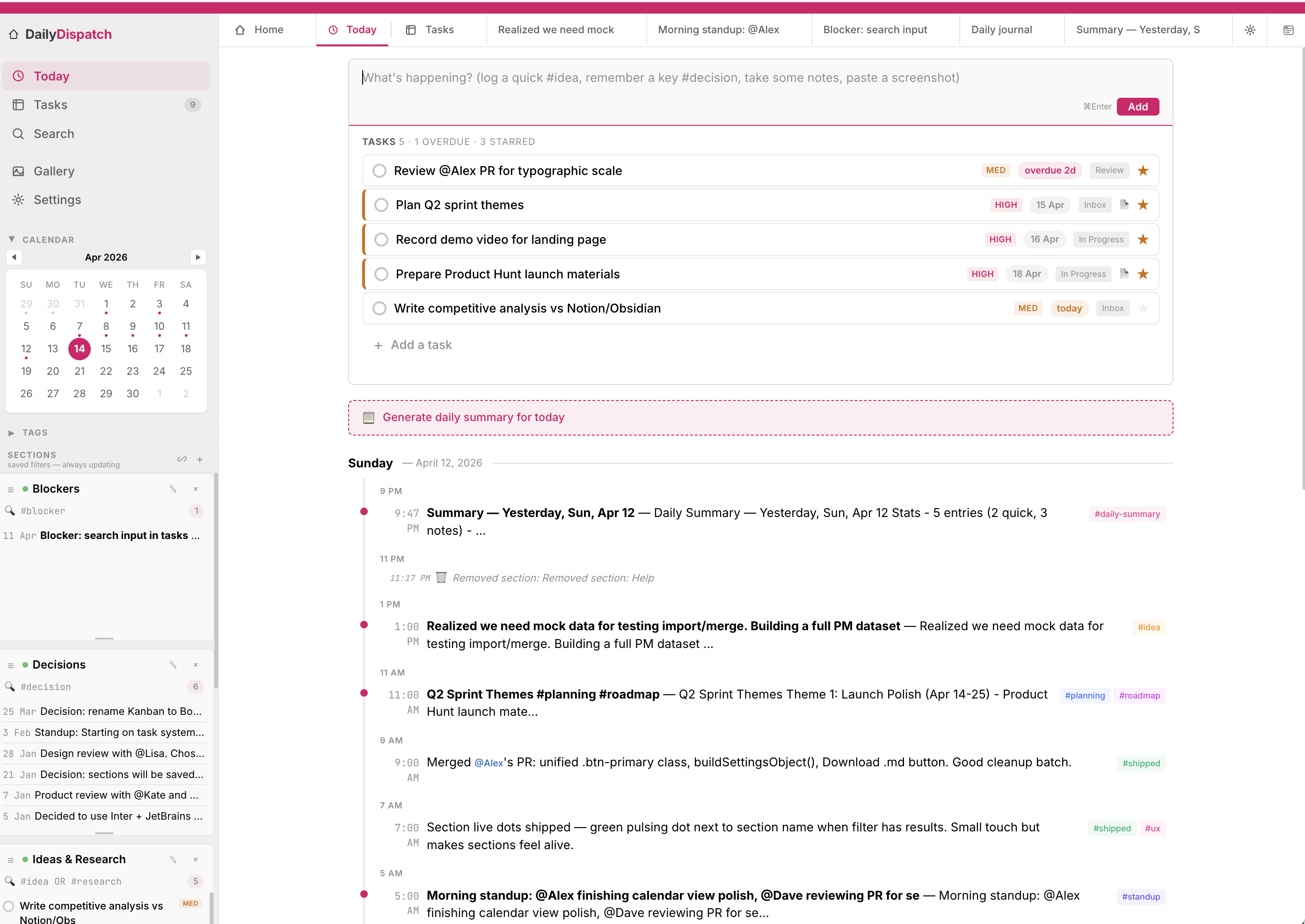
This render now follows the real DailyDispatch homepage: hot-pink active state, left navigation, calendar, saved sections, top tab strip, large capture composer, task block, summary prompt, and the daily feed below.
Markdown is the source of truth for text. Headings, lists, code, quotes, links, and task syntax stay portable. Tables are there when work needs a real grid instead of prose pretending to be organized.
/table, /task, /date, and /template.Goal: ship a quiet, useful first release.
| Area | Owner | Status |
|---|---|---|
| Onboarding | Mira | Draft |
| Tasks | Jonah | Ready |
| Backup | Sam | Review |
A task manager is useful, but work rarely begins as a perfect task. DailyDispatch lets notes contain checkboxes, priorities, dates, and status so the action item remains attached to the context.
Interview pattern: people want a journal that feels structured without becoming another dashboard to administer.
Tasks can be viewed three ways without becoming the whole product. Use Kanban for flow, calendar for dates, and list view for the fastest path through what needs doing.
Pop a note into a small separate window and keep it over a video call, research tab, or design review. You can keep typing without losing the main app, and the note syncs back when you close it.
- Users trust local storage when backup is explained clearly.
- Add a "first 5 minutes" setup guide.
- Question: should Smart Lists ship with examples?
Smart Lists are reusable filters for the way you actually think: blockers, decisions, people, tags, open questions, launch work, or anything else you keep coming back to. Pin them in the sidebar for navigation, or embed them directly inside a note when a project brief needs live context.
#blocker, @alex, #decision, or combined filters.This note holds the plan, but the Smart List below stays live as new matching dispatches and tasks appear.
Settings make data ownership explicit. Export a full JSON backup, restore from a previous backup, and download individual notes as Markdown. Your journal should be easy to protect, move, inspect, and walk away with.
Export a complete local backup whenever you want. Restore it in another browser or keep it with your normal files.
Entries, notes, tasks, Smart Lists, people, tags, images, theme, floating note settings, and open tabs.
Switch between warm light palettes and focused dark themes without leaving your local file.
DailyDispatch is free. If it becomes part of your workflow, there is a local QR block for Buy Me a Coffee.
The point is not to replace every tool. The point is to give your thinking a dependable local home with just enough structure to stay searchable later.
Every dispatch lands in a chronological feed so your work has a memory. It is less brittle than folders and easier to review than a pile of loose files.
Create focused views for #client, @person, open questions, or decisions. Keep them in the sidebar, or embed them inside notes as live context.
Find notes, jump around, and execute common actions quickly. The app is designed for people who already think with a keyboard.
Insert tables, tasks, dates, status markers, code blocks, templates, and Smart Lists without hunting through menus.
Tasks can live inside notes and also roll up into Kanban, calendar, and list views when you need execution mode.
Back up JSON, download Markdown, keep copies in git or iCloud, and avoid the quiet lock-in of cloud-only note systems.
You liked Obsidian's local files but did not want to design a whole operating system for your notes. You liked Notion's structure but not the cloud dependency. You liked Apple Notes until your work needed better search, markdown, and task context.
DailyDispatch is for engineers, PMs, designers, researchers, consultants, founders, and other people whose work is mostly thinking and typing. It gives you a working system on day one, then stays simple enough that you can understand, modify, and back up the whole thing.
Every note app wants something from you. DailyDispatch tries very hard not to.
Every common action has a shortcut. Open the command palette, find any note, create a task, submit an entry, or pop out a floating note without breaking flow.
Free to download, use, and modify. No strings attached.
Download DailyDispatchIf you remix it, patch it, or bend it into something useful, send a note to dailydispatch@torgcrafted.com. I'd genuinely love to see what you made and borrow inspiration for improving the tool.